Ένας επισκέπτης επιβεβαιώνει την κράτησή του τηλεφωνικά και χρειάζεται να πληρώσει προκαταβολή. Για την επόμενη άφιξη πρέπει να βρεθεί δωμάτιο διαθέσιμο για ολόκληρη τη διαμονή. Παράλληλα, έχετε ένα τιμολόγιο προμηθευτή να καταχωρίσετε και έναν νέο συνάδελφο που μαθαίνει το ημερολόγιο.
Οι πρόσφατες προσθήκες στο Roomismo αφορούν αυτή την καθημερινή δουλειά. Επεκτείναμε τη διαχείριση εξόδων και τις επιλογές πληρωμής, προσθέσαμε εργαλεία για την κατανομή δωματίων και τον χρόνο προετοιμασίας, και κάναμε πιο εύκολη την παρακολούθηση της απόδοσης και την εκμάθηση του προγράμματος. Προσθέσαμε επίσης έναν νέο βοηθό AI για την ομάδα του καταλύματος.
Ας δούμε τι αλλάζει στην πράξη.
Από την επιβεβαίωση της κράτησης στην προκαταβολή
Μια κράτηση από το τηλέφωνο ή το email χρειάζεται έναν πρακτικό τρόπο είσπραξης. Με τους συνδέσμους πληρωμής, μπορείτε να ετοιμάσετε ένα αίτημα μέσα από την κράτηση και να το μοιραστείτε με τον επισκέπτη. Εκείνος ολοκληρώνει την πληρωμή μέσω του συνδεδεμένου παρόχου σας.
Στις επιλογές περιλαμβάνεται πλέον το Nexi/Alpha Bank, μαζί με το Viva. Μπορείτε να ζητήσετε προκαταβολή ή εξόφληση υπολοίπου, συνδέοντας την πληρωμή με τις αντίστοιχες χρεώσεις της κράτησης. Η ομάδα σας παρακολουθεί την πληρωμή μέσα στο Roomismo, μαζί με τα υπόλοιπα στοιχεία της διαμονής.
Προηγείται η ρύθμιση της σύνδεσης με τον πάροχο για το κατάλυμά σας. Από εκεί και πέρα, ο σύνδεσμος δίνει στον επισκέπτη ένα σαφές επόμενο βήμα για να πληρώσει.
Για τις απευθείας κρατήσεις από τη μηχανή κρατήσεών σας, υπάρχει και μια ακόμη προσθήκη: η παρακολούθηση μετατροπών. Το Roomismo υποστηρίζει Meta Pixel και Google Tag Manager, στέλνοντας συμβάντα ολοκληρωμένης κράτησης με την αξία και το νόμισμα.
Έτσι έχετε ένα συμβάν που αντιστοιχεί σε ολοκληρωμένη κράτηση, πέρα από τις επισκέψεις στη σελίδα. Αν χρησιμοποιείτε το Google Tag Manager για αποστολή δεδομένων στο Google Ads ή στο GA4, χρειάζεται να ρυθμίσετε και αυτούς τους προορισμούς. Η εγκατάσταση παρακολούθησής σας μπορεί στη συνέχεια να αξιοποιήσει το συμβάν για να μετρήσει το αποτέλεσμα μιας καμπάνιας.
Αξιοποιήστε καλύτερα τα διαθέσιμα δωμάτια
Κάποιες φορές, το πρόβλημα στη διαθεσιμότητα προκύπτει από την κατανομή των κρατήσεων. Σκεφτείτε δύο δωμάτια του ίδιου τύπου: το πρώτο έχει μια μελλοντική κράτηση δύο διανυκτερεύσεων στην αρχή ενός τετραημέρου και το δεύτερο μια αντίστοιχη κράτηση στο τέλος. Κάθε βράδυ υπάρχει ελεύθερο δωμάτιο, αλλά κανένα δεν είναι διαθέσιμο και για τις τέσσερις διανυκτερεύσεις.
Η αυτόματη κατανομή δωματίων μπορεί να αναδιατάξει επιλέξιμες μελλοντικές διαμονές μέσα στον ίδιο τύπο δωματίου, ώστε να ελευθερωθεί ένα δωμάτιο για όλη τη διάρκεια της νέας κράτησης. Στο παράδειγμα αυτό, οι δύο μικρότερες διαμονές μπορούν να τοποθετηθούν διαδοχικά στο ένα δωμάτιο, αφήνοντας ελεύθερο το άλλο.
Η λειτουργία αφορά διαμονές που επιτρέπεται να αλλάξουν δωμάτιο, χωρίς να μετακινεί επισκέπτες που έχουν ήδη κάνει check-in. Χρειάζεται ενεργοποίηση σε κατάλληλο κατάλυμα και προς το παρόν υπάρχει περιορισμός όταν είναι εγκατεστημένες έξυπνες κλειδαριές. Βοηθά στην αξιοποίηση των κενών της κατανομής, ενώ ένα πλήρες κατάλυμα εξακολουθεί να έχει τα πραγματικά όρια της χωρητικότητάς του.
Υπάρχουν όμως και ημέρες που θέλετε σκόπιμα να μείνει ένα δωμάτιο εκτός διαθεσιμότητας. Μια βίλα μπορεί να χρειάζεται μία ολόκληρη ημέρα προετοιμασίας ανάμεσα σε επισκέπτες, ακόμη κι αν ο ίδιος ο καθαρισμός διαρκεί λιγότερο.
Με τις κενές ημέρες προετοιμασίας, ορίζετε τον απαιτούμενο χρόνο ανά τύπο δωματίου. Το Roomismo διατηρεί τα αντίστοιχα μπλοκαρίσματα πριν και μετά τις διαμονές και τα συνυπολογίζει στη διαθεσιμότητα των συνδεδεμένων καναλιών. Αν αλλάξει ή ακυρωθεί μια κράτηση, ενημερώνονται και τα σχετικά μπλοκαρίσματα.
Ο χρόνος προετοιμασίας αποκτά έτσι τη θέση του στο ημερολόγιο διαθεσιμότητας. Μέσα σε αυτό το διάστημα, η διαδικασία housekeeping καλύπτει τις εργασίες που χρειάζεται να γίνουν.
Οργανώστε τα έξοδα μαζί με την καθημερινή λειτουργία
Το τιμολόγιο του προμηθευτή από εκείνο το γεμάτο πρωινό έχει πλέον τη θέση του στη διαχείριση εξόδων. Καταχωρίζετε το έξοδο με προμηθευτή και κατηγορία, παρακολουθείτε αν έχει εξοφληθεί και φιλτράρετε τη λίστα για να δείτε τι εκκρεμεί. Τα σύνολα δείχνουν συγκεντρωτικά τα πληρωμένα και τα ανεξόφλητα ποσά.
Για σταθερές δαπάνες, μπορείτε να οργανώσετε επαναλαμβανόμενα έξοδα με εβδομαδιαίο ή μηνιαίο πρόγραμμα. Υπάρχει επίσης εξαγωγή σε CSV, όταν χρειάζεται να επεξεργαστείτε τα στοιχεία εκτός Roomismo.
Για τα καταλύματα με την αντίστοιχη σύνδεση AADE myDATA, τα παραστατικά που λαμβάνουν από προμηθευτές μέσω myDATA μπορούν να εισαχθούν στα έξοδα. Η οικονομική διαχείριση επεκτείνεται έτσι πέρα από την έκδοση παραστατικών προς τους επισκέπτες, με λιγότερα στοιχεία για χειροκίνητη καταχώριση. Η εισαγωγή προϋποθέτει την κατάλληλη λειτουργία και τα στοιχεία σύνδεσης.
Η καταχώριση ενός εξόδου και της κατάστασής του σας βοηθά να το παρακολουθείτε. Η ίδια η οθόνη εξόδων δεν εκτελεί την πληρωμή προς τον προμηθευτή.
Δείτε πώς πήγε ο μήνας
Οι καθημερινές αποφάσεις παίρνονται στο ημερολόγιο, αλλά οι ιδιοκτήτες χρειάζονται και μια συνολική εικόνα. Η νέα μηνιαία αναφορά ιδιοκτητών στέλνει τη σύνοψη του προηγούμενου πλήρους μήνα στο email των ενεργών χρηστών με τα αντίστοιχα οικονομικά δικαιώματα.
Η αναφορά περιλαμβάνει έσοδα δωματίων και πληρότητα, μαζί με τη μέση ημερήσια τιμή και τα έσοδα ανά διαθέσιμο δωμάτιο. Προσφέρει συγκρίσεις με τον προηγούμενο μήνα και τον ίδιο μήνα του προηγούμενου έτους, καθώς και στοιχεία ανά κανάλι κρατήσεων και άλλους δείκτες διαμονών.
Μπορείτε να ξεκινήσετε από εκεί για να εξετάσετε μια μεταβολή στην πληρότητα ή τη σχέση ανάμεσα στις απευθείας κρατήσεις και στις κρατήσεις από κανάλια. Το email αποστέλλεται προς το παρόν στα αγγλικά και αφορά την απόδοση του καταλύματος. Δεν υπολογίζει εκκαθάριση ιδιοκτήτη ή πλήρη κατάσταση κερδών και ζημιών.
Βοηθήστε τον νέο συνάδελφο να ξεκινήσει
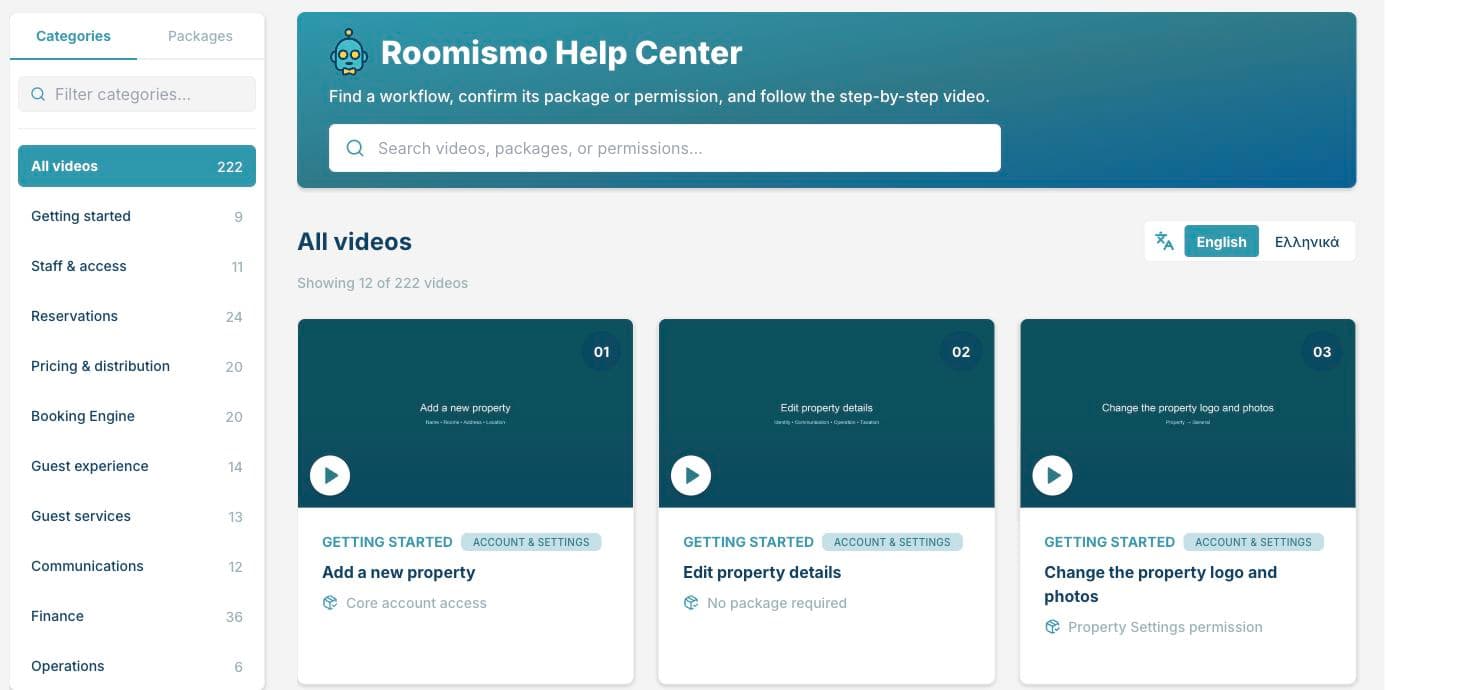
Τα νέα εργαλεία γίνονται πιο χρήσιμα όταν η ομάδα μπορεί να τα μάθει μέσα στην εργάσιμη ημέρα. Το ενσωματωμένο Help Center του Roomismo διαθέτει πλέον περισσότερα από 200 εκπαιδευτικά βίντεο, με επιλογές στα ελληνικά και στα αγγλικά.
Το προσωπικό μπορεί να αναζητήσει μια εργασία ή να περιηγηθεί ανά θέμα, είτε μαθαίνει να δημιουργεί κράτηση είτε θέλει να θυμηθεί μια διαδικασία που δεν έχει χρησιμοποιήσει πρόσφατα. Τα βίντεο βρίσκονται μέσα στο Roomismo, ώστε ο συνάδελφος να βρίσκει την επίδειξη που χρειάζεται την ώρα που δουλεύει.
Ένας βοηθός AI για την ομάδα σας
Ο βοηθός AI του Roomismo βοηθά το προσωπικό να ελέγχει τα τρέχοντα στοιχεία του καταλύματος και να προετοιμάζει ενέργειες για έλεγχο από τον χρήστη.
Για παράδειγμα, ένας συνεργάτης μπορεί να ρωτήσει για τη διαθεσιμότητα ή να χρησιμοποιήσει το μήνυμα ενός επισκέπτη για να προετοιμάσει μια κράτηση. Ο βοηθός υποστηρίζει επίσης προετοιμασία εισαγωγής κρατήσεων από υπολογιστικά φύλλα και αρχεία CSV, καθώς και από υποστηριζόμενα PDF και εικόνες.
Ο έλεγχος αποτελεί μέρος της διαδικασίας. Το προσωπικό εξετάζει τα προτεινόμενα στοιχεία και επιβεβαιώνει τις υποστηριζόμενες αλλαγές πριν εφαρμοστούν, ενώ ο βοηθός λειτουργεί με τα δικαιώματα του χρήστη στο συγκεκριμένο κατάλυμα. Ισχύουν επίσης όρια μεγέθους και μορφής αρχείων.
Για να δείτε πώς ταιριάζουν αυτές οι προσθήκες στο κατάλυμά σας, μιλήστε με την ομάδα του Roomismo. Μπορούμε να σας δείξουμε τις σχετικές διαδικασίες και να ελέγξουμε ποιες λειτουργίες και συνδέσεις παρόχων είναι διαθέσιμες για τη δική σας εγκατάσταση.